
Every time a new Android version drops, we expect UI polish, smoother animations, maybe a new system toggle.
But android 17.0?
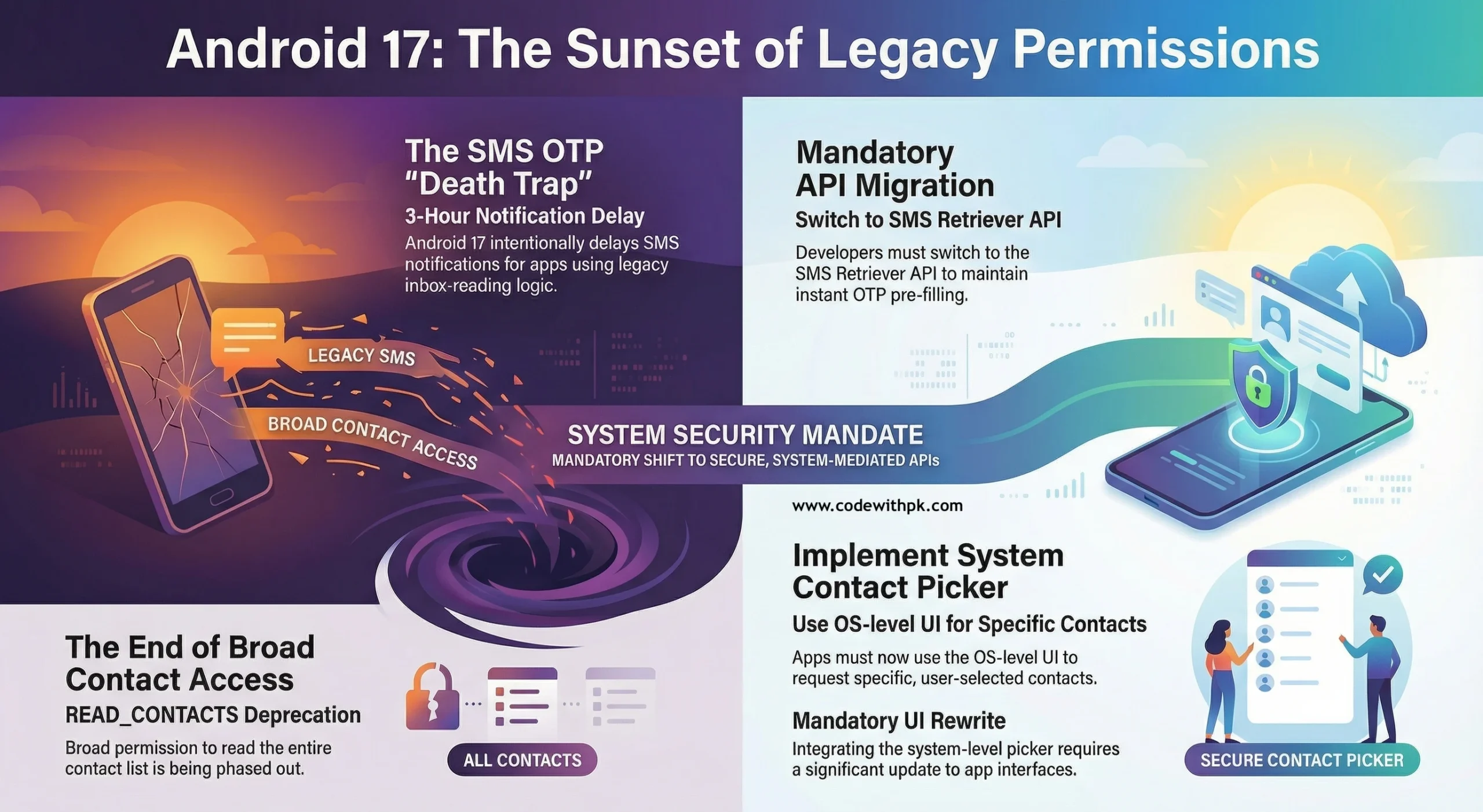
This one quietly attacks two of the most common shortcuts used in production apps:
📩 SMS inbox reading for OTP
📇 Broad READ_CONTACTS permission
And if your app still depends on either — this update is not optional reading.
This is survival.
⚠️ Android 17.0 Beta 2: The Changes Nobody Is Talking About
While most headlines are focused on performance and UI refinements in android 17, two under-the-radar platform shifts could break real-world login and onboarding flows.
Let’s break them down properly — developer to developer.
1️⃣ The 3-Hour OTP Delay – The Death of SMS Inbox Scraping 📩
If your app reads the entire SMS inbox to detect OTP codes automatically, you’re living on borrowed time.
With android 17.0, apps relying on legacy SMS inbox reading may experience intentional delays of up to THREE HOURS before receiving notification of new SMS messages.
Yes. Three hours.
Now think about your login screen:
👉 User enters phone number
👉 OTP is sent
👉 App waits to auto-read SMS
👉 Nothing happens
From the user’s perspective?
Your app is broken.
From Google’s perspective?
You should have migrated already.
This change is clearly designed to force developers to adopt:
✔️ SMS Retriever API
✔️ SMS User Consent API
✔️ Secure server-side verification flows
No more inbox scraping.
No more shortcuts.
🤔 “What Does Sent as SMS Mean?” — Why This Matters
Many developers still misunderstand how SMS flows are handled at the OS level.
When users ask, “what does sent as sms mean?”, they’re usually referring to fallback messages sent as traditional carrier SMS instead of RCS or other messaging protocols.
Android 17’s stricter SMS handling aligns with broader sms compliance news trends globally:
• Increased carrier monitoring
• OTP abuse prevention
• Anti-spam enforcement
• Better user data protection
This isn’t random.
This is ecosystem-level tightening.
2️⃣ Goodbye to Broad READ_CONTACTS 📇
The second major shift in android 17.0 is around contacts access.
For years, apps have requested:
READ_CONTACTS
Which effectively means:
“Give me access to the user’s entire contact database.”
That era is ending.
Android is introducing a system-level Contact Picker, similar to the Photo Picker rollout.
New model:
👉 App triggers OS contact picker
👉 User selects specific contact(s)
👉 OS returns only selected data
From a privacy perspective?
Brilliant move.
From a product perspective?
It forces:
• UI rewrites
• Permission flow redesign
• Refactoring of contact-sync assumptions
Bulk access logic? Reconsider it.
Silent background contact reads? Rework them.
🔐 Why Android 17 Is Becoming Stricter
Zoom out for a second.
android 17 isn’t just another version bump.
It reflects a larger shift:
📉 Less tolerance for permission overreach
📉 Less tolerance for inbox scraping
📉 Less tolerance for background hacks
📈 More user consent
📈 More system-controlled flows
📈 More secure APIs
Google is slowly transforming Android into a permission-minimized, structured platform.
Not fully closed — but far more regulated.
🧠 What Developers Should Do Immediately
If you’re running production Android apps, here’s your action plan.
✅ Audit Your OTP Flow
If you’re reading the full SMS inbox:
Migrate immediately to:
• SMS Retriever API
• User Consent API
• Or silent verification alternatives
Test on Android 17 Beta now — not after Play Store deadline panic.
✅ Audit Contacts Access
If your app uses:
READ_CONTACTS
Start planning migration to:
• Contact Picker APIs
• Scoped contact access
The earlier you refactor, the smoother your Play Store updates will be.
✅ Monitor SMS Compliance News
Carriers and regulators worldwide are tightening OTP and messaging standards.
Stay updated on:
• OTP fraud mitigation
• Carrier filtering changes
• SMS sender ID regulations
• Regional anti-spam laws
Android 17.0 aligns with this global enforcement trend.
This is not a one-off platform experiment.
🚀 The Bigger Picture of Android 17.0
Users won’t notice this update immediately.
They’ll just experience:
✔️ More secure apps
✔️ Fewer abusive permissions
✔️ Cleaner consent flows
Developers, however, will feel the architectural shift.
This is Android growing up.
The platform is no longer permissive by default.
It’s intentional. Structured. Guarded.
🎯 Final Thoughts
android 17.0 is not flashy.
It’s foundational.
If your app still starts with:
“Enter number → Wait for SMS → Read inbox silently”
You are officially on borrowed time.
If your app grabs full contacts access “just in case,”
You need a redesign roadmap.
The wall isn’t falling.
It’s rising.
And as Android developers, we adapt — or we break.
Made with ❤️ by codewithpk.com
Keep building. Keep learning. Keep shipping.
#Android17 #Android17_0 #AndroidDevelopment #AndroidDev #SMS #OTP #SMSCompliance #AppSecurity #Privacy #MobileDevelopment #CodeWithPK